The deal you lost last month probably didn’t fall through at the price negotiation. It slipped away two days after the site visit, when nobody followed up. Don’t your business have site visit follow-up automation?
This is the quiet pattern in almost every brokerage. A buyer visits the property, likes it, and goes home to “think about it.” Your team gets busy with the next set of visits. By the time someone remembers to call, the buyer has already seen three other projects and stopped replying.
Site visits are where real estate deals are decided. Follow-up is where they’re won. And right now, most of that follow-up is happening from memory, sticky notes, and a personal WhatsApp that’s drowning in unread chats.
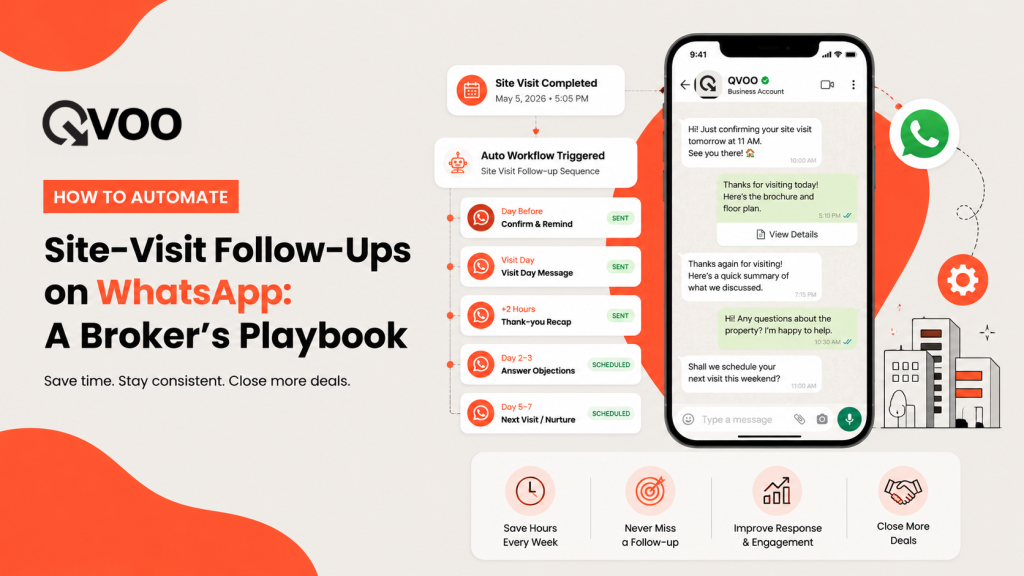
There’s a better way. You can automate the routine parts of your site-visit follow-up on WhatsApp so the right message goes out at the right time, every time – without sounding like a robot and without spamming anyone. Here’s the playbook.
Why site-visit follow-up breaks down
It’s rarely about effort. Your team works hard. The problem is that follow-up depends on a human remembering – and humans forget when they’re juggling 40 active leads.
Three things go wrong again and again:
- No-shows eat the day. A buyer confirms a 5 PM visit, then doesn’t turn up. Nobody nudged them that morning, so the slot is wasted.
- The post-visit window closes fast. Interest is highest in the first 48 hours after a visit. Miss that window and the buyer cools off.
- Follow-up is invisible. When messages go out from personal phones, the team lead has no idea who was contacted, what was said, or what the buyer replied.
Automation fixes the timing. A clear workflow fixes the visibility. You need both.
The site-visit follow-up sequence that actually works
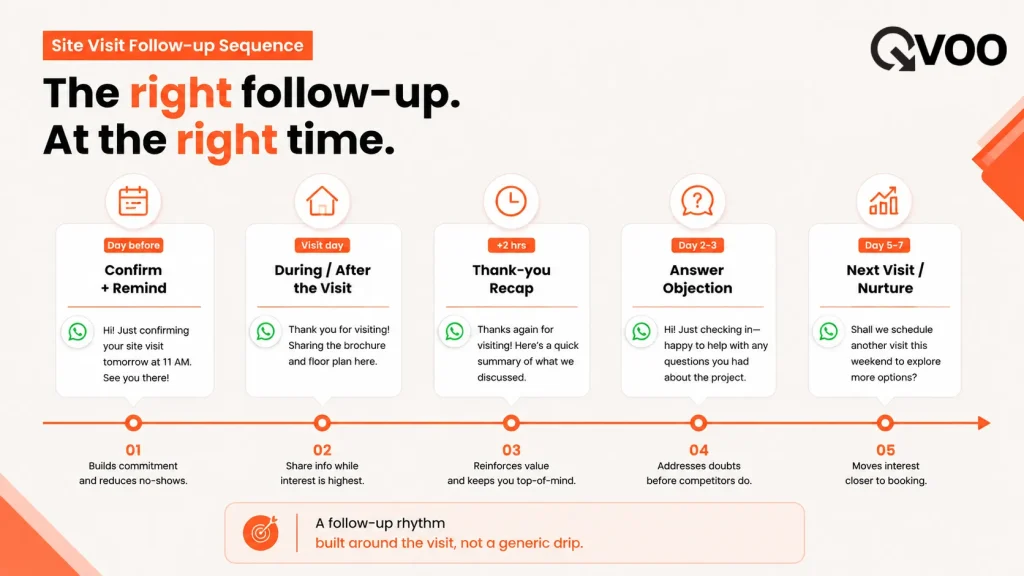
Forget generic “Day 1, Day 3, Day 7” drip templates. A site visit has a natural shape, and your follow-up should follow it. Here’s a sequence built around how buyers actually behave.
Before the visit – confirm and remind
The day before, send a short WhatsApp confirming the date, time, and location with a map pin. On the morning of the visit, send a quick reminder. This one step alone cuts no-shows dramatically, because most no-shows aren’t rejections – they’re forgotten appointments.
Right after the visit – say thank you and stay warm
Within a couple of hours, send a friendly recap: the unit they saw, the key highlights, and one clear next step. This is the most valuable message in the whole sequence, and it’s the one teams skip most often.
Two to three days later – answer the real question
By now the buyer is comparing options. Send something useful: a payment plan summary, a floor plan, or the answer to whatever objection came up during the visit. Helpful, not pushy.
Day five to seven – make the next move easy
If there are positive signals, offer a second visit or a call. If signals are weak, send a softer nudge with one strong reason to revisit the project, and move the lead to a longer nurture rhythm.
The skill isn’t in sending more messages. It’s in sending fewer, better-timed ones – and never going silent in the 48 hours that matter most.
How to make site visit follow-up automation (without sounding like a robot)
Automation gets a bad name when it turns into spam. The fix is simple: automate the timing and the reminders, keep the message human, and always leave room to personalise.
Here’s what to automate and what to keep manual:
- Automate the trigger. When a site visit is scheduled, the confirmation and morning reminder should fire on their own. You shouldn’t have to remember.
- Automate the next step. The moment a visit is marked complete, the next follow-up should already be on the calendar. No gaps.
- Keep the words yours. Use a few approved message templates as a starting point, then let your agent add the one detail that makes it personal – the child’s school nearby, the east-facing balcony they loved.
- Respect the buyer. Space your messages out and cap how many go in a day. A buyer who feels chased will go quiet. A buyer who feels looked after will pick up the phone.
The goal is a system where no lead falls through the cracks and no buyer feels spammed.
How Qvoo CRM does this for real estate teams
Qvoo CRM currently helps real estate teams manage enquiries, follow-ups, property leads, sales pipeline, and bookings from one place – built on a scalable platform with a broader CRM vision for more industries in the future. Site-visit follow-up is one of the workflows it’s built around.
Here’s how the playbook above maps to Qvoo:
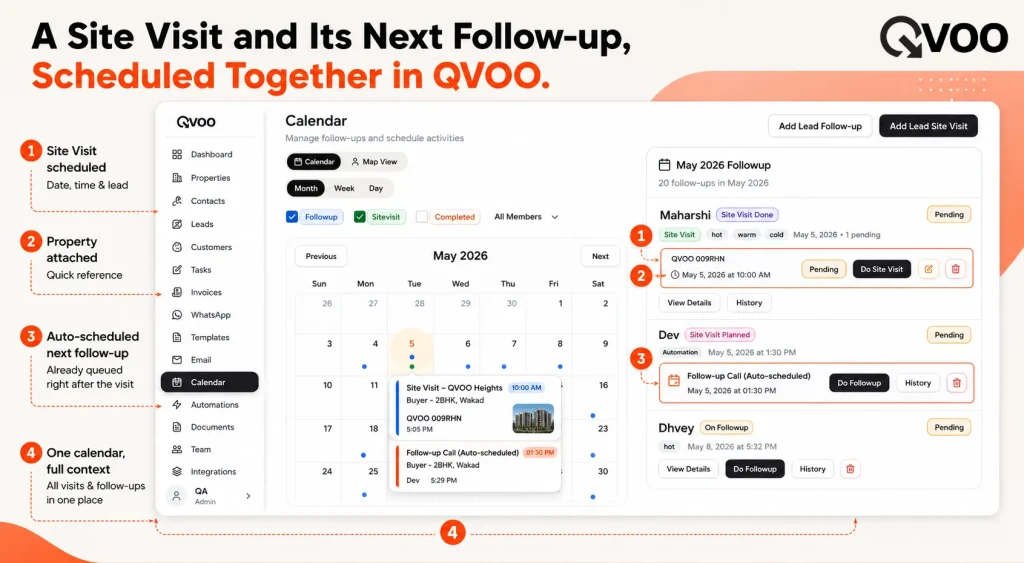
- Schedule the visit in the Calendar. Add a site visit against a lead with the date, time, property, and notes. The visit shows up on the team calendar, on web and on the mobile app, so everyone can see who’s visiting what and when.
- Reminders go out on their own. When you schedule a follow-up or site visit, Qvoo schedules the reminders for it automatically. Change the date and the reminders reschedule themselves.
- The next step is never forgotten. Qvoo’s follow-up automations can complete the current visit and schedule the very next follow-up in one action – so the post-visit message is already booked before your agent moves on.
- Send WhatsApp follow-ups from the CRM. Reach a buyer one-to-one, or send a controlled batch to a group of post-visit leads, with built-in sending delays so your messages stay spaced out and natural rather than blasting everyone at once.
- Everything is on the record. Each visit, message, and outcome is logged on the lead’s activity timeline, so a team lead can see exactly where every buyer stands – no more follow-up happening invisibly on personal phones.
A simple way to start tomorrow
You don’t need to automate everything on day one. Pick the two messages that matter most and get those running first: the morning-of reminder (kills no-shows) and the post-visit thank-you (keeps the lead warm). Once those are reliable, add the day-three objection message and the day-seven next step.
Measure one number to start: how many buyers get a follow-up within 48 hours of their visit. Get that close to 100% and your conversion will move on its own.
Conclusion
Site visits are expensive – your team’s time, the travel, the coordination. Letting the follow-up slip afterward wastes all of it. The brokers who win aren’t sending more messages; they’re sending the right message at the right moment, every single time, because the system carries the timing for them.
If you’d like to see how a structured follow-up workflow looks for your team, book a quick Qvoo demo and we’ll walk through the site-visit flow with your own process in mind.
Want to automate your Business?
Automate your business with QVOO and scale it on large levels.
Explore how QVOO automates business.
Frequently asked questions
How do I automate site visit follow-ups on WhatsApp?
Trigger the routine messages off the visit itself: a confirmation and morning reminder before the visit, a thank-you recap after it, and a timed nudge a few days later. A real estate CRM like Qvoo can schedule these reminders automatically and let you send the WhatsApp messages from one place, while you keep the wording personal.
Will automated WhatsApp follow-ups annoy buyers?
Not if you space them out and keep them useful. Automate the timing, not the personality – use approved templates as a base, add a personal detail, and cap how many messages go out per day. Qvoo’s controlled sending adds delays between messages so they don’t all fire at once.
What’s the best time to follow up after a site visit?
The first 48 hours. Buyer interest is highest right after a visit, so a thank-you recap within a couple of hours and a helpful follow-up within two to three days work best. After day seven, move the lead into a slower nurture rhythm.
How do I reduce site visit no-shows?
Most no-shows are forgotten appointments, not rejections. A confirmation the day before and a short reminder on the morning of the visit cut no-shows sharply. Qvoo schedules these reminders for you when you book the visit.
Can a small brokerage do this without a big tech team?
Yes. You don’t need anything technical – just a CRM that schedules reminders and sends WhatsApp messages for you. Start with two automated touchpoints (the morning reminder and the post-visit thank-you) and expand from there.
Where do I see what follow-ups were already sent?
In Qvoo, every visit, message, and outcome is recorded on the lead’s activity timeline, so you and your team lead can see exactly who was contacted, when, and what the buyer said – instead of follow-up happening invisibly on personal phones.