

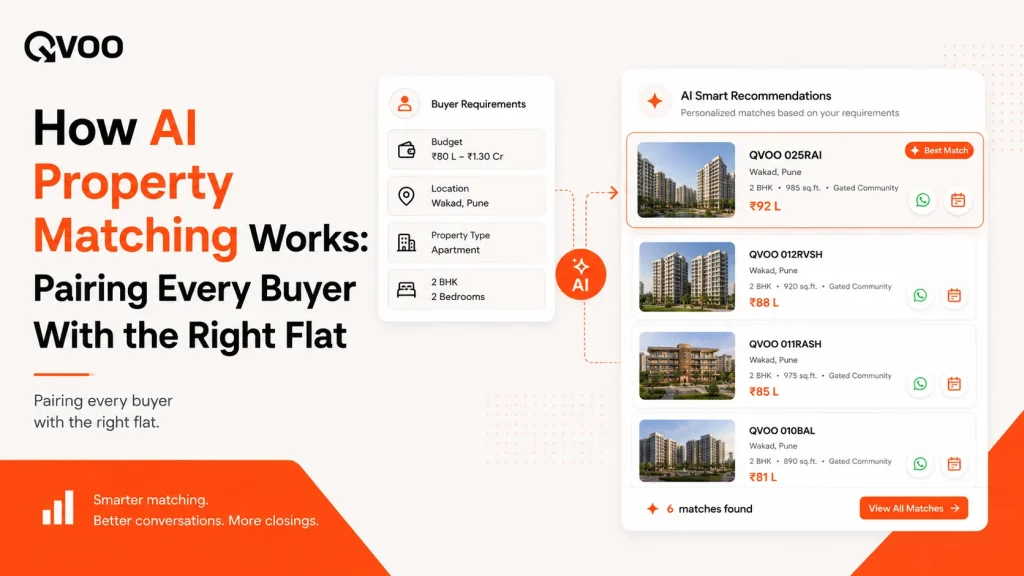
A buyer calls about a 2 BHK in Wakad, budget 75 lakh, possession within a year. You know you have something that fits. But it’s sitting somewhere across 300 listings, three WhatsApp groups, and a spreadsheet your junior last updated on Tuesday.
By the time you find the right three flats, the buyer has booked a site visit with someone faster.
This is the everyday cost of doing matching by memory. AI property matching fixes it by doing in seconds what your team does from memory and scrolling. Below is how it actually works, and how a broker uses it on a live call and on a new launch.
What “AI property matching” actually means
Forget the sci-fi version. In a real estate CRM, property matching is simply this: the software reads what a buyer wants and compares it against what you actually have for sale, then shows you the listings that fit.
The buyer’s wants are not a guess. They’re the details your team already records on every lead budget, location, configuration (1/2/3 BHK), property type (flat, plot, commercial), and possession timeline. The inventory is your live property list with its own price, area, type, and status.
Matching is the work of holding both sides up against each other and surfacing the overlap. A human can do it for five leads. Across five hundred, it falls apart. That’s the job the machine is good at fast, consistent, and never tired at 7 PM.
One honest note up front: this is matching on stated requirements against live stock, not a black box that predicts the future. It tells you which flats fit this buyer right now. The conversation, the trust, and the close are still yours. Used that way, it’s a genuine time-saver. Sold as a magic closing machine, it disappoints.
How the match is made, step by step
It helps to see the pieces in order.
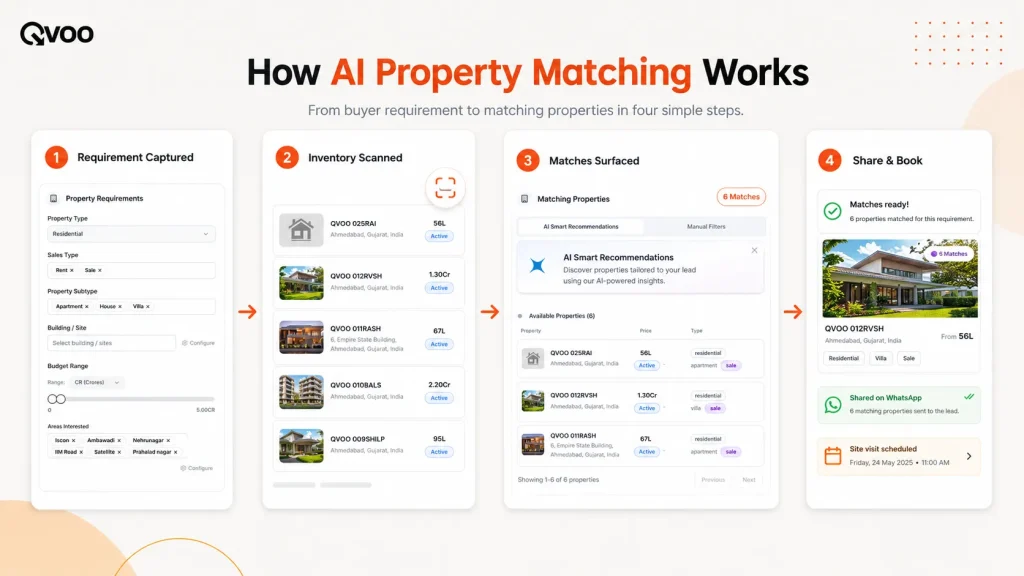
- The requirement gets captured once. When a lead comes in from a portal like 99acres or MagicBricks, a Meta ad form, or your website the budget, location, and configuration land on the lead record. Capture this cleanly once and every later step works. Capture it sloppily and matching has nothing to work with.
- The system scans your live inventory. Against each lead, the matching logic checks your property catalogue for listings that fit the requirement and are still available. It ignores sold and archived stock so you never pitch a flat that’s gone.
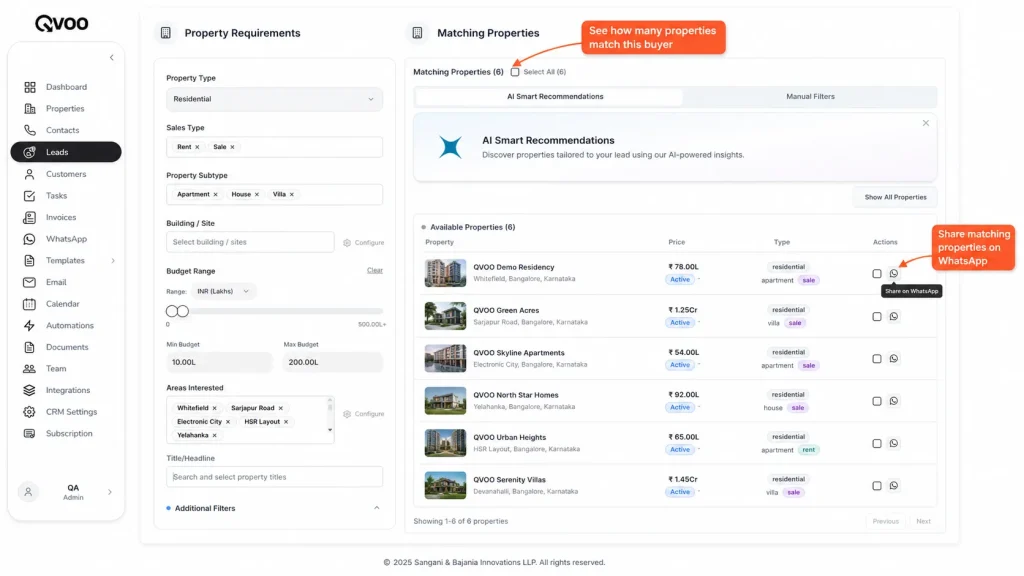
- You get a match count and a shortlist. On the lead, you see how many properties currently match. Open the lead and you get the actual list of matching flats, not just a number ready to read out, share, or attach to a site visit.
- You act, in the same place. From that shortlist you share the flats to the buyer on WhatsApp, or book a site visit against them. No copying details into a separate message app, no re-typing the buyer’s number.
Where it pays off: two everyday moments
Matching earns its keep in two situations every broker knows.
The live buyer. Someone is on the phone or in your office, ready to talk. Instead of “let me check and call you back,” you open their lead and read out three flats that fit their budget and area while they’re still warm. The difference between a same-minute shortlist and a next-day callback is often the difference between your site visit and a competitor’s.
The new launch. A developer hands you a fresh tower. The slow way is to broadcast it to your whole list and annoy 400 people. The smart way is to start from the listing and pull every buyer whose recorded requirement fits this project the right 30, not the random 400. You call people who actually want what you’re selling, and your message stops feeling like spam.
Both directions run on the same idea: keep requirements and inventory in one system, and let the match surface the overlap.
What good matching needs from you
The technology is only as good as the data you feed it. Three habits make the difference.
First, capture the requirement every time. Budget, location, and configuration on every lead not just the ones you remember. A blank requirement matches nothing.
Second, keep inventory status honest. Mark sold flats sold and archive dead stock. Matching against a stale catalogue pitches buyers things that no longer exist and burns trust fast.
Third, update the requirement when it changes. A buyer who started at 60 lakh and is now stretching to 80 should be re-matched, not stuck on last month’s number. The match is always only as current as the lead.
Do these three, and matching quietly does the heavy lifting for the rest of your week.
How this works in Qvoo
Qvoo CRM currently helps real estate teams manage enquiries, follow-ups, property leads, sales pipeline, and bookings from one place built on a scalable platform with a broader CRM vision for more industries in the future. Property matching sits right inside that flow.
When a lead is captured, Qvoo matches its recorded requirements against your live property list and shows a match count on the lead itself. Open the lead and you see the actual matching properties, ready to act on. From there you can share the shortlist to the buyer over WhatsApp Business using approved templates, or schedule a site visit against the exact flats and every share and visit is logged on the lead’s activity timeline, so nothing gets lost between team members.
It runs the other way too. Open any listing say, that new tower and Qvoo shows the leads in your database whose requirements fit it, so you call the right buyers first instead of blasting everyone.
The point isn’t to replace your judgment. It’s to put the right flats and the right buyers in front of you in seconds, so you spend your time talking to people instead of scrolling through stock. You can read more about this in our QVOO blog.
The takeaway
AI property matching isn’t about replacing brokers. It’s about ending the daily scramble of matching from memory. Capture the requirement cleanly, keep your inventory current, and let the system hold both sides up against each other. You get the right shortlist in seconds for the buyer on the line and the project that just launched.
Want to see your own leads matched to your own inventory in one place? Book a Qvoo demo and watch a buyer go from enquiry to a shared shortlist in under a minute.
Explore QVOO’s AI-Powered Tools
👉 QVOO AI Property Recommendations
👉 QVOO Property Module
👉 QVOO Leads Management
QVOO’s AI for Real Estate CRM is built for one purpose –
to help your team close deals faster by matching the right properties to the right clients instantly.
Frequently Asked Questions
What is AI property matching in real estate?
It’s software that reads a buyer’s recorded requirements budget, location, configuration, property type and compares them against your live inventory to surface the listings that fit. It does in seconds what a broker does from memory, but across hundreds of leads and listings at once.
Does AI property matching replace the agent?
No. It surfaces which flats fit a buyer right now and which buyers fit a new listing. The call, the trust, the negotiation, and the close are still the agent’s job. Think of it as a fast shortlisting assistant, not an autonomous closer.
How accurate is property matching?
It’s exactly as accurate as your data. Matching compares stated requirements against current stock, so clean capture (correct budget and location on every lead) and honest inventory status (sold marked sold) are what make the shortlist trustworthy.
Can it match a new launch to existing buyers?
Yes. Matching works both directions. From a listing you can pull every buyer in your database whose recorded requirement fits the project, so you call the right people first instead of broadcasting to your whole list.
Does Qvoo do property matching?
Yes. Qvoo CRM matches each lead’s requirements against your live property list, shows a match count on the lead, surfaces the matching flats on the lead detail, and lets you share them on WhatsApp or book a site visit and it shows matching buyers from any listing too.
What data do I need for matching to work?
At minimum, a budget, a location, and a configuration on each lead, plus an up-to-date inventory with correct listing status. Capture the requirement once at lead entry and keep it updated when the buyer’s brief changes.