
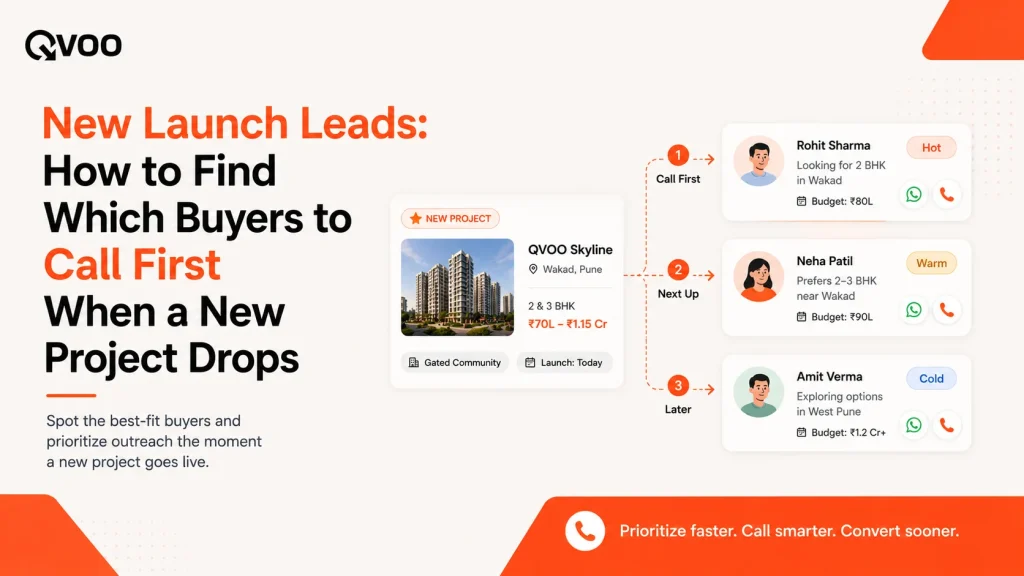
A builder calls you Monday morning. A new tower just opened for bookings 2 and 3 BHKs, ready-to-move, a price band your buyers actually ask for. You have three days before every other broker in the city floods the same buyers with the same message.
So who do you call first?
If the honest answer is “let me scroll through my WhatsApp groups and old Excel sheets,” you have already lost a day. Somewhere in your database are the exact people who told you, weeks or months ago, that they wanted this size, in this area, in this budget. The problem was never a shortage of buyers. It was that their requirements were sitting in your head and your chats instead of somewhere you could search in seconds.
This is the play that wins new launches: don’t start from the buyer, start from the property. Point at the new project and ask your database one question which of my buyers already wanted exactly this?
Why brokers miss the buyers they already have
New-launch selling has a short window and a long memory problem. Over a quarter you might speak to hundreds of enquiries. Each one mentions a size, a locality, a budget, a reason for buying. Then the conversation moves on, and those details scatter a note here, a WhatsApp voice message there, a half-filled row in a sheet.
When the inventory finally lands, you cannot hold all of that in your head. So most teams do one of two things. They blast the new project to their entire list, which annoys the 80% it does not fit and trains everyone to ignore you. Or they call whoever they happen to remember, which means the perfect buyer for that 3 BHK never gets the call because they enquired four months ago.
Both are guesses. And in a three-day window, guessing is expensive.
Start from the property, not the buyer
The fix is a mindset flip. Instead of opening each buyer and asking “what should I show them,” open the new project and ask “who does this fit.”
To do that reliably, three things have to be true, and none of them are about technology they are about habit:
- Every enquiry’s requirement is captured the same way, every time. Type, configuration, locality, budget range, purpose (end-use or investment), timeline. If those live as structured fields instead of free text, they are searchable later.
- The new inventory is entered with the same fields. The project’s type, configuration, location, and price band should be described in the same language your buyer requirements use, so a match is possible.
- You match, then you prioritise. Matching tells you who fits on paper. You still read the list with a broker’s judgment who was most serious, who is ready now, who was only browsing and you call in that order.
Do those three, and the “who do I call first” question stops being a memory test.
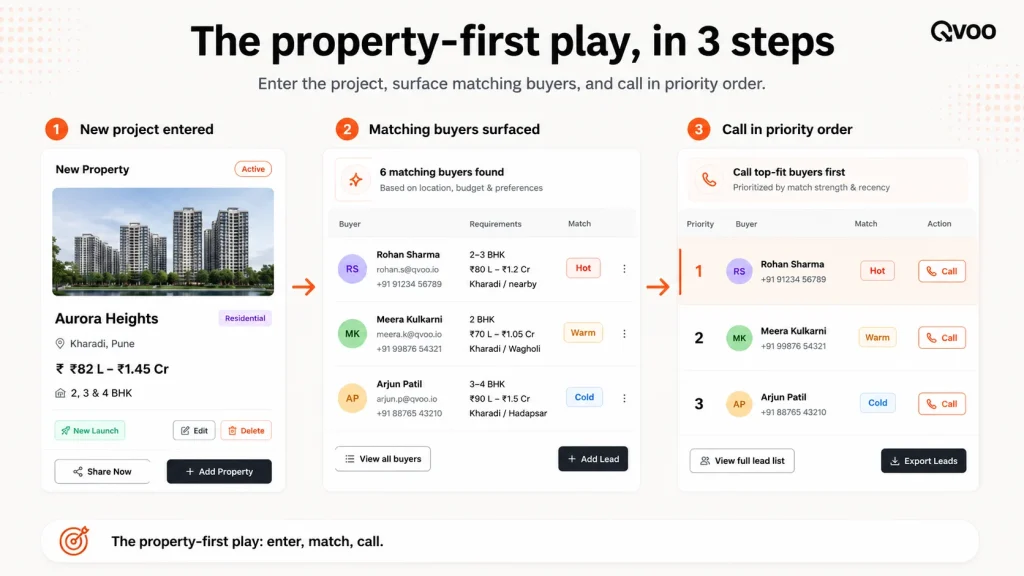
A three-day new-launch playbook
Here is how a broker or a small sales team can work a fresh drop without blasting everyone.
Day 1 Enter the project and surface the fit list. Add the new launch to your inventory with its real details. Then look at which buyers in your database match it. Your goal by end of day is a shortlist, not a mass message.
Day 1–2 Assign and call in order. Split the shortlist across the team so no buyer gets two calls and none get zero. Call the most serious, most ready buyers first. Send the project details on WhatsApp to the rest so they have it while you work down the list.
Day 2–3 Book site visits and set the next step. Every genuine “yes, tell me more” should end with a booked site visit or a dated follow-up not a vague “I’ll get back to you.” A new launch converts on the visit, so protect the calendar.
Ongoing Re-run the match when the next tower opens. The same database answers the next launch too. Buyers you couldn’t place today are tomorrow’s matches when different inventory drops.
How Qvoo runs this play
Qvoo CRM currently helps real estate teams manage enquiries, follow-ups, property leads, sales pipeline, and bookings from one place built on a scalable platform with a broader CRM vision for more industries in the future. Here, the useful part is that the matching runs from the property side, not just the buyer side.
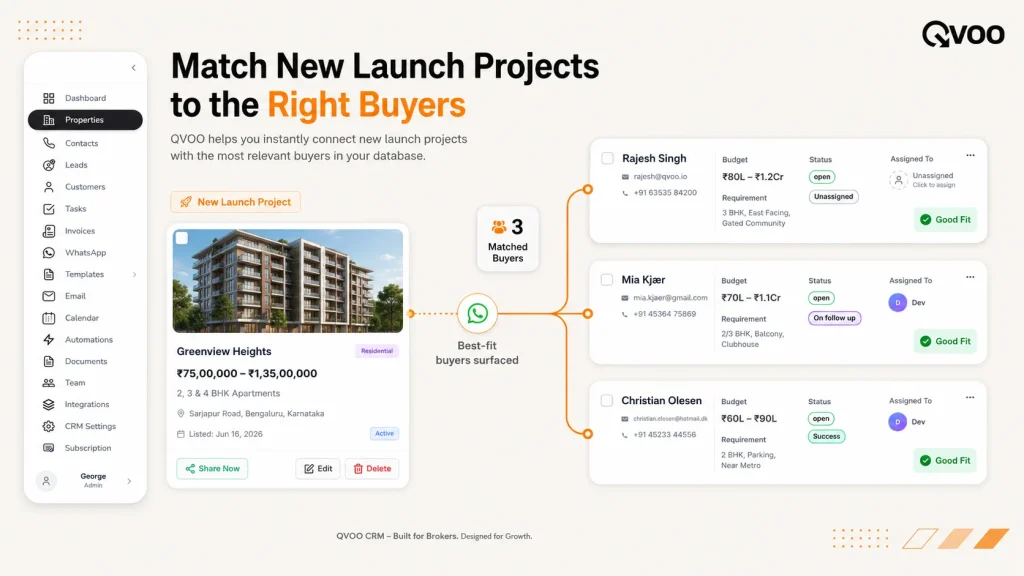
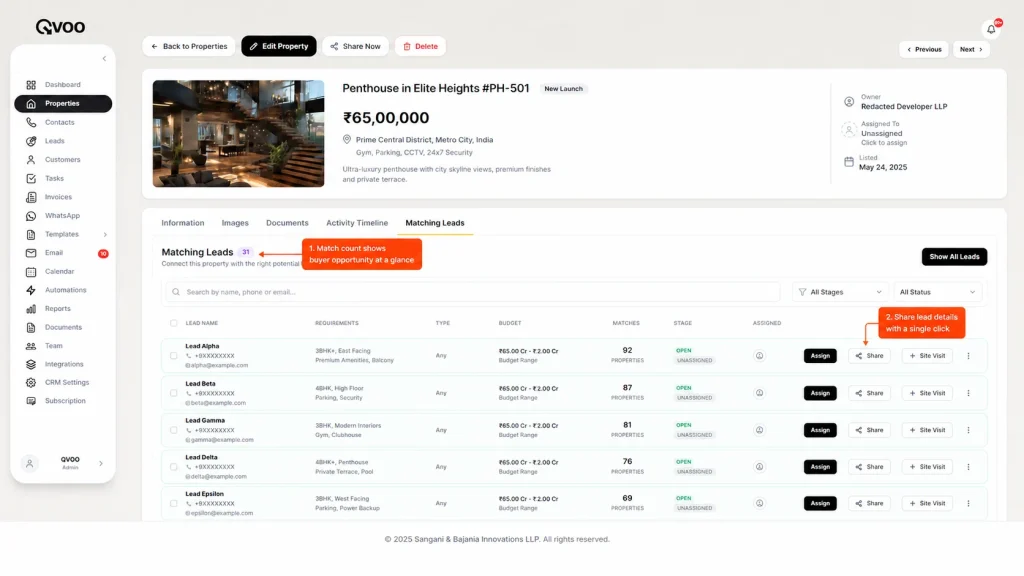
When you open a property in Qvoo, it shows you its Matching Leads the buyers in your workspace whose saved requirements fit that property, with a match count so you can see the size of the opportunity at a glance. This is the reverse of the buyer view, where each lead already carries a live count of how many properties match them. Same engine, pointed at the new launch.
From that matching-leads list, your team can:
- Assign each buyer to an owner so the shortlist is split cleanly and nobody double-calls.
- Share the project on WhatsApp send the listing to a buyer, or send it in bulk to a group of matched buyers with an approved message and attachments, using the WhatsApp Business connection. Each share is logged.
- Book a site visit or add a follow-up right from the buyer’s record, so the next step is on the calendar before you hang up.
- See it all on the activity timeline, so a manager can tell who was contacted, who got the listing, and who’s booked without asking.
To make the match list worth trusting, the buyers have to be in the system in the first place. Qvoo auto-captures enquiries from property portals like 99acres, MagicBricks and Housing.com, from Meta Ads lead forms, and from your website forms so the database that answers your next launch is filling itself while you sell.
One honest note: matching surfaces which of your buyers fit on paper. It does not decide who will buy. You still bring the judgment about who is serious and who is ready the system just makes sure the right names are in front of you before the window closes.
The takeaway
New launches are won in the first few hours, and they are won by relevance, not volume. The broker who calls ten buyers who genuinely wanted this project beats the one who messages a thousand who didn’t. Capture requirements cleanly, enter your inventory the same way, and let the match tell you where to start then work the list with your own judgment.
If you want the “who do I call first” question answered in seconds instead of an afternoon, see how Qvoo handles new-launch matching or book a quick demo.
Still confused whom to contact for your latest listings ?
If you get lost between excel sheets and data and miss on the leads that matches the projects and can be a potential buyers. Then it’s time you need to get a system for your business which gives you structure. QVOO gives you access to matching buyers instantly and start your sales pipeline.
👉 QVOO AI Property Recommendations
👉 QVOO Property Module
👉 QVOO Leads Management
QVOO’s AI for Real Estate CRM is built for one purpose –
to help your team close deals faster by matching the right properties to the right clients instantly.
Frequently asked questions
How do I find which buyers to call for a new project launch?
Start from the property, not the buyer. Enter the new project with its real details type, configuration, location, price band then look at which buyers in your database saved matching requirements. In Qvoo, opening a property shows its Matching Leads with a match count, so you get a shortlist instead of guessing from memory.
Should I broadcast a new launch to my whole list?
No. Blasting everyone annoys the majority it doesn’t fit and trains people to ignore you. Match the launch to the buyers whose requirements actually fit, call the most serious first, and send details on WhatsApp to the rest. Relevance converts better than volume in a short new-launch window.
What buyer details do I need to capture for matching to work?
The essentials are property type and configuration, locality, budget range, purpose (end-use or investment), and timeline. Captured as structured fields at first contact not as free-text notes those details stay searchable, so a new launch can be matched against them months later.
Can I share a new launch with matched buyers on WhatsApp?
Yes. Qvoo’s WhatsApp Business connection lets you share a listing with a buyer, or send it in bulk to a set of matched buyers with an approved message and attachments. Each share is logged on the activity timeline so your team can see who received what.
Does the CRM decide who will buy?
No, and it shouldn’t claim to. Matching surfaces which of your buyers fit a property on paper. You still apply broker judgment about who is serious and ready. The value is speed and accuracy in building the call list the closing is still yours.
How do I not lose the buyers I couldn’t place this time?
Keep them in the database with clean requirements. The same list answers your next launch buyers who didn’t fit today become matches when different inventory drops. Re-run the match each time a new project opens.