

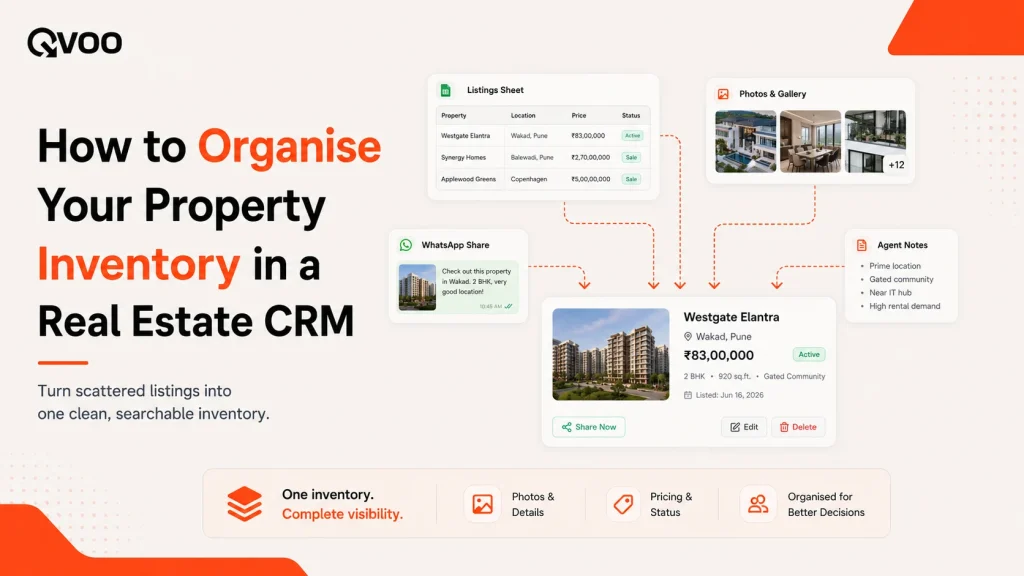
A buyer calls. They want a 2BHK in your budget range, ready to move in. You know you have three that fit. But one is on your phone gallery, one is in a WhatsApp group, and the price of the third changed last week and you can’t remember the new number.
So you promise to “send details in five minutes.” Two hours later, you’re still hunting.
This is the quiet cost of messy inventory. Not a lost lead in one dramatic moment just a slow drip of slow replies, wrong prices, and flats you pitch after they’re already sold. When you’re handling ten listings, your memory holds it together. Past fifty, across resale flats, rentals, and three builder projects, memory stops being a system.
Good property inventory management fixes this. It means every listing lives in one place, is easy to find, carries the right price and photos, and can be shared in seconds. Below is a simple way to get there and how a CRM like Qvoo runs it for you.

Why property inventory gets messy
Inventory rarely falls apart all at once. It slips in small, ordinary ways.
Your listings live in too many places a spreadsheet, your gallery, a notebook, and a few WhatsApp broadcasts. When a buyer asks, you check all of them.
Details go stale. A price drops, a unit gets booked, an owner changes the terms. But the old number is already saved in five chats, so you keep quoting it.
Photos and documents scatter. The good pictures are on one phone, the floor plan is in an email, the agreement copy is with your partner. Sending a clean set means chasing three people.
And nobody owns a listing. When two people on your team are both “sort of” handling the same flat, the owner gets called twice and the buyer gets two different quotes.
None of these is a disaster on its own. Together, they make you look slower and less sure than you actually are.
Put every listing in one place with the details that matter
The first move is the simplest: one home for every property, not five.
A single listing should carry everything a buyer asks about type and configuration, locality, price, area, and the specifics that fit that kind of property. In Qvoo, you add a property by choosing its type, sales type, and subtype, then filling the fields that matter for it. A resale flat, a rental, and a plot don’t all need the same details, so the form shows the right fields for each.
Add the photos and documents to the listing itself not a separate folder. The floor plan, the agreement copy, the good pictures all sit on the property, so a full set is always one tap away. On the Qvoo mobile app you can shoot photos at the site and upload them straight to the listing while you’re standing in the flat.
The point is boring but powerful: when a buyer asks, you open one record and everything is there.
Use listing status so you never pitch a sold flat
The single most useful habit in inventory management is keeping status honest.
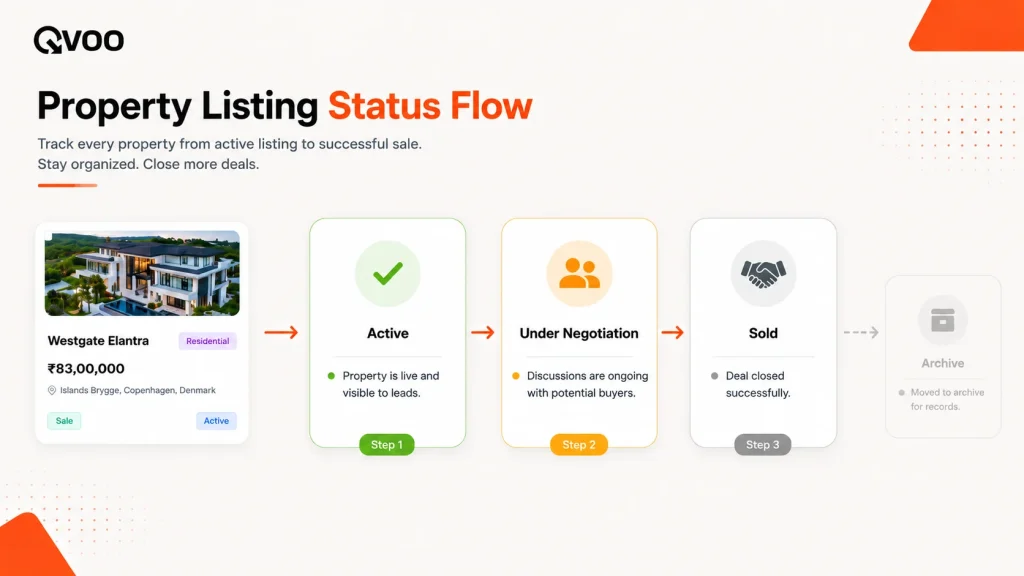
Every property is in one of a few states available, under negotiation, sold, or parked for later. If that status is right, you never waste a buyer’s time on a flat that’s gone, and you never forget one that’s quietly still available.
Qvoo gives every listing a status Active, Sold, and Archive by default and you can add your own, like “Under Negotiation” or “On Hold,” each with its own colour. Filter by “Active” and you’re looking only at what you can actually sell today. Mark a flat “Sold” the moment it books, and it drops out of your live list automatically.
Make it a rule: the status changes the day the reality changes. A two-second update saves an embarrassing call later.
Give every listing an owner on your team
Inventory works best when each property has a clear person responsible for it.
That person keeps the price current, holds the owner relationship, and answers when a buyer wants that specific flat. Without it, listings fall into a shared-pile no-man’s-land where everyone assumes someone else is handling it.
In Qvoo, an admin can assign a property to one or more team members, and reassign it later without losing the record of who had it before. When you take on a new project with fifty units, you can assign the whole batch in one go rather than one at a time. Every assignment is logged on the property’s own activity timeline, so there’s never a debate about who was looking after what.
Move your existing inventory in without retyping
If your listings already live in a spreadsheet, you don’t start from a blank slate.
Qvoo lets you import your inventory from a CSV or Excel file. You download a template, drop your data in, upload it, and review a preview before anything is saved. The system flags likely duplicates the same flat entered twice under slightly different names so you clean up as you import instead of discovering the mess later.
For a broker carrying an old master sheet of a few hundred properties, this is the difference between “I’ll switch someday” and switching this week.
Share the right listing in seconds on WhatsApp
Organising inventory only pays off at the moment a buyer asks. That moment almost always happens on WhatsApp.
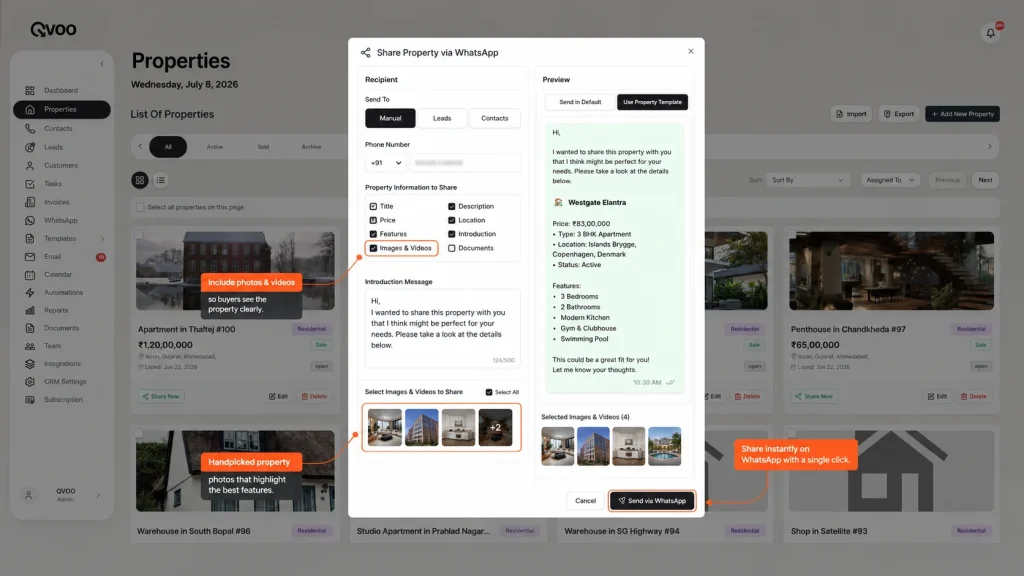
From any listing in Qvoo, you can share it on WhatsApp Business to a lead, a saved contact, or a typed-in number. You choose which details to include and attach the photos and documents already on the property, so the buyer gets a clean, complete set instead of a forwarded jumble. You can send one listing to one buyer, or a shortlist to a group, using approved message templates.
Because you’re sharing from the live record, the price and status are always the current ones not last month’s number saved in an old chat. And every share is logged on the listing’s timeline, so you can see what went to whom.
Let your inventory point you to buyers
Clean inventory does one more thing that a spreadsheet never can: it tells you who to call.
When your listings and your buyer requirements are both captured properly, Qvoo can open any property and show you the leads whose requirements fit it a matching leads view right on the listing. So when a new project drops or a flat’s price is cut, you don’t scroll your whole database wondering who might care. You open the listing, see the buyers it fits, and start calling.
A quick note on expectations: matching surfaces which buyers fit on paper configuration, locality, budget. It doesn’t know who’s serious or ready to close. That’s still your read of the person. The tool saves you the search; you still do the selling.
Read your inventory like a report
Once everything is in one place, you can finally see the shape of what you’re holding.
Qvoo’s property reports show your inventory status how much is active, under negotiation, sold, or parked and how individual listings are performing, including the site visits and shares tied to them. For an agency owner or a builder’s sales head, that’s the answer to “what do we actually have, and what’s moving” without asking three people and cross-checking two sheets.
A simple weekly inventory habit
You don’t need a big process. Fifteen minutes a week keeps inventory clean:
- Filter to Active and scan for anything that shouldn’t be there a booked flat still showing as available, a listing with no photos.
- Fix statuses mark what’s sold, park what’s on hold, reactivate what’s back on the market.
- Check ownership make sure every live listing has a person on it.
- Add what’s new enter this week’s fresh inventory the same way, with full details, so next week it’s ready to share.
Do this, and the next time a buyer calls, you won’t be hunting. You’ll open one record, see the right flat with the right price and photos, and send it before the call ends.
Where Qvoo fits
Qvoo CRM currently helps real estate teams manage enquiries, follow-ups, property leads, sales pipeline, and bookings from one place built on a scalable platform with a broader CRM vision for more industries in the future. Its Properties module is where your inventory lives: add listings with photos and documents, organise them by status, assign them to your team, import an existing sheet, share the right one on WhatsApp, and see the buyers each listing fits all without leaving the record.
The result isn’t just a tidier list. It’s looking as fast and as sure as you actually are, every time a buyer asks.
Ready to get your inventory in order? Book a Qvoo demo and see how your listings, buyers, and follow-ups sit in one place.
Still managing inventory inside Excel, Drive, WhatsApp etc.?
If you still juggle between multiple softwares to manage your inventory and getting confused, then it’s time you get your business a CRM. A CRM that is specially curated for your specific business type could help you manage everything according to your needs inside a single software. QVOO does exactly the same, it give your business end to end management, either its inventory or leads or automations or WhatsApp sharing, everything from a single dashboard.
A simple, structured CRM for real estate teams helps agents close faster; managers track better, and businesses grow without chaos.
Explore more:
👉 QVOO Leads Management
👉 QVOO Contacts Management
👉 QVOO Calendar Reminders
👉 QVOO Teams Management
Frequently Asked Questions
What is property inventory management in real estate?
It’s the practice of keeping every listing organised in one place with current price, status, photos, and documents so you can find and share the right property instantly. Good inventory management means you never pitch a sold flat or quote an old price.
How do I organise property listings as a broker?
Keep every listing in one system instead of spreadsheets, galleries, and chats. Record the key details on each property, keep its status honest (active, under negotiation, sold), assign an owner on your team, and store photos and documents on the listing itself so a full set is always one tap away.
Can I move my existing property list into a CRM without retyping everything?
Yes. Qvoo lets you import your inventory from a CSV or Excel file using a template, with a preview and duplicate detection before anything is saved so you can bring in hundreds of listings at once instead of entering them one by one.
How can I share a property listing quickly on WhatsApp?
From any listing in Qvoo you can share it on WhatsApp Business to a lead, contact, or number, with the photos and documents already attached to the property. Because you share from the live record, the price and status are always current.
How do I stop pitching properties that are already sold?
Use listing status. Mark a flat “Sold” the moment it books, then filter your list to “Active” so you only ever see and share what’s genuinely available today.
Does a CRM tell me which buyers match a property?
When your listings and buyer requirements are both captured properly, Qvoo shows a matching-leads view on each property the buyers whose requirements fit that listing. It surfaces who fits on paper; judging who’s serious and closing the deal is still the agent’s job.