
It’s Monday morning. Forty fresh leads came in over the weekend some from 99acres, a few from a Meta ad, the rest from your website. They’re sitting in a shared inbox. Three agents open it at once. Two of them call the same buyer within an hour. One good lead nobody opens at all.
By Friday, that lead has gone cold and a competitor has booked the site visit.
This is the part of lead management nobody talks about. Everyone worries about getting more leads. Far fewer brokers have a clear answer to a simpler question: once a lead arrives, whose is it?
Get real estate lead assignment right and your team moves fast, never steps on each other, and you can see exactly who is responsible for every enquiry. Get it wrong and even great leads leak out the side not because nobody called, but because everybody assumed somebody else would.
Here’s how to fix it.
Why “everyone can see every lead” is the problem, not the solution
Most small broker teams start with a shared spreadsheet or a shared inbox. It feels efficient everyone sees everything, anyone can pick up any lead.
In practice it creates three problems at once.
Double-calling. Two agents both spot a hot lead and both dial. The buyer gets two calls from the same agency in ten minutes and assumes you’re disorganised. That’s a bad first impression you can’t take back.
Cherry-picking. Agents quietly skim the leads that look easy and leave the rest. The “boring” leads smaller budget, vague requirement sit untouched. Some of those were ready to buy.
Zero accountability. When a lead goes cold, you ask “who was handling this?” and get shrugs. Nobody owned it, so nobody dropped it, so nobody learns from it.
The fix is not more visibility. It’s clear ownership every lead has exactly one person responsible for the next step, and everyone knows who that is.
The four ways teams hand out leads
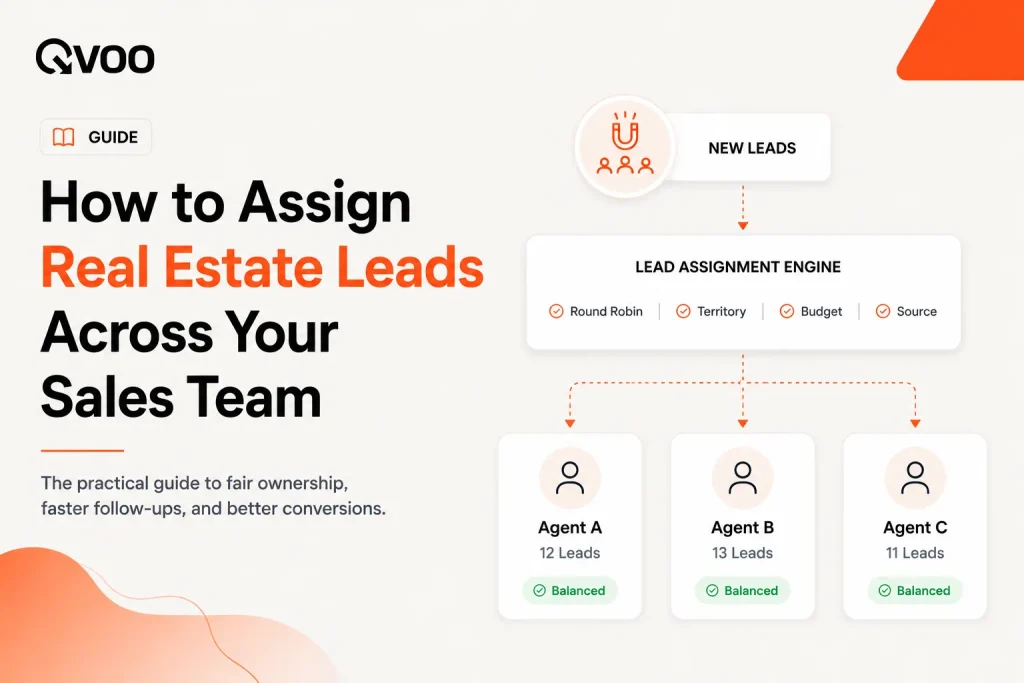
Before you pick a tool, pick a rule. There are four common ways to distribute leads, and most teams use a mix.
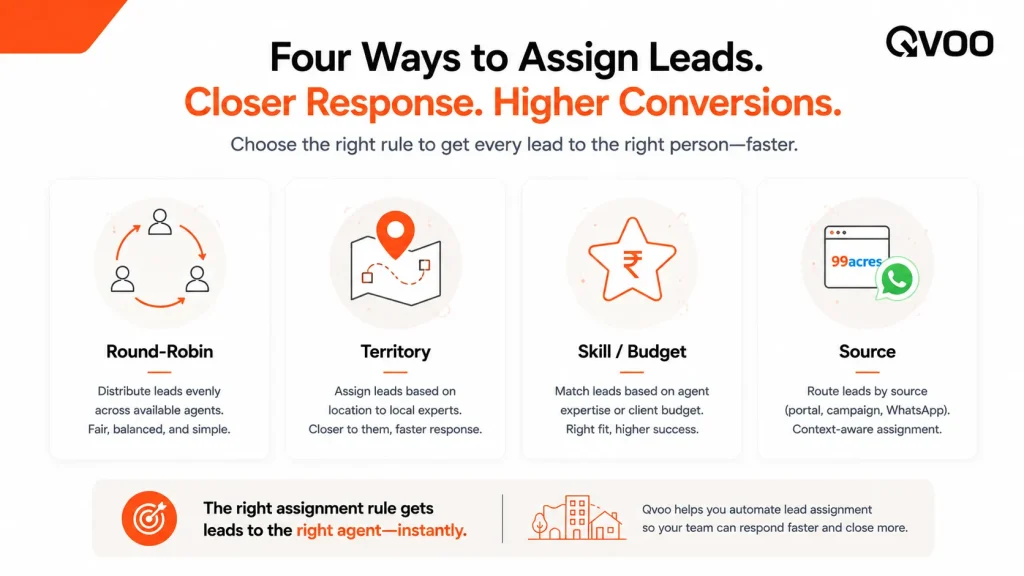
Round-robin. Leads go to agents in turn agent 1, then 2, then 3, then back to 1. Simple and fair, good when your agents are roughly interchangeable. The weakness: it ignores who’s actually good at what.
By territory or project. A lead for a project in Wakad goes to the agent who knows Wakad; a lead for a particular tower goes to the agent handling that tower. This works well for builders and channel-partner teams where knowledge of one location or project really matters.
By skill or budget band. Your strongest closer gets the high-value enquiries; newer agents get the steady mid-market flow. This protects your best leads but needs honest judgement about who’s ready for what.
By source. Portal leads to one desk, walk-ins to another, referral leads to a senior agent. Useful when different sources need a genuinely different sales approach.
There’s no single right answer. A small team of four similar agents is fine with round-robin. A builder with three projects across a city is better off routing by project. The important thing is to decide the rule and write it down, so assignment isn’t a daily argument.
What “good” lead assignment actually looks like
A rule is only half the job. The other half is making the rule stick day to day. A healthy assignment system does five things:
- Every lead gets an owner the moment it arrives not at the end of the day, not “whenever someone picks it up.” The first hour after a lead comes in is when it’s most likely to answer the phone.
- The owner is obvious to everyone. No guessing, no “I think Rahul was on that one.” The name is attached to the lead.
- Agents see their own leads clearly, without scrolling through 200 leads that belong to colleagues. A focused list is a worked list.
- You can reassign in seconds when an agent is on leave, leaves the company, or is simply overloaded without the lead’s history getting lost.
- A duplicate enquiry goes back to the same owner. When a buyer who called last month fills in a new portal form, that’s not a new lead for a new agent it belongs to whoever already built the relationship.
If your current setup fails even two of these, that’s where leads are leaking.
How Qvoo CRM handles lead assignment
Qvoo CRM currently helps real estate teams manage enquiries, follow-ups, property leads, sales pipeline, and bookings from one place built on a scalable platform with a broader CRM vision for more industries in the future. Lead ownership sits at the centre of how it keeps a team organised.
Here’s how the pieces fit together.
Leads land in one place, ready to assign. Enquiries from property portals, Meta and Google ads, and your website forms come into the same Leads module instead of a scattered inbox. From there you assign each lead to an agent one at a time, or several at once with bulk assign when a batch comes in over the weekend.
Reassigning is one action. When someone’s on leave or a lead needs a stronger closer, a manager (or anyone with assign permission) reassigns it. The lead moves to the new agent with its full history intact no copy-pasting, no lost context.
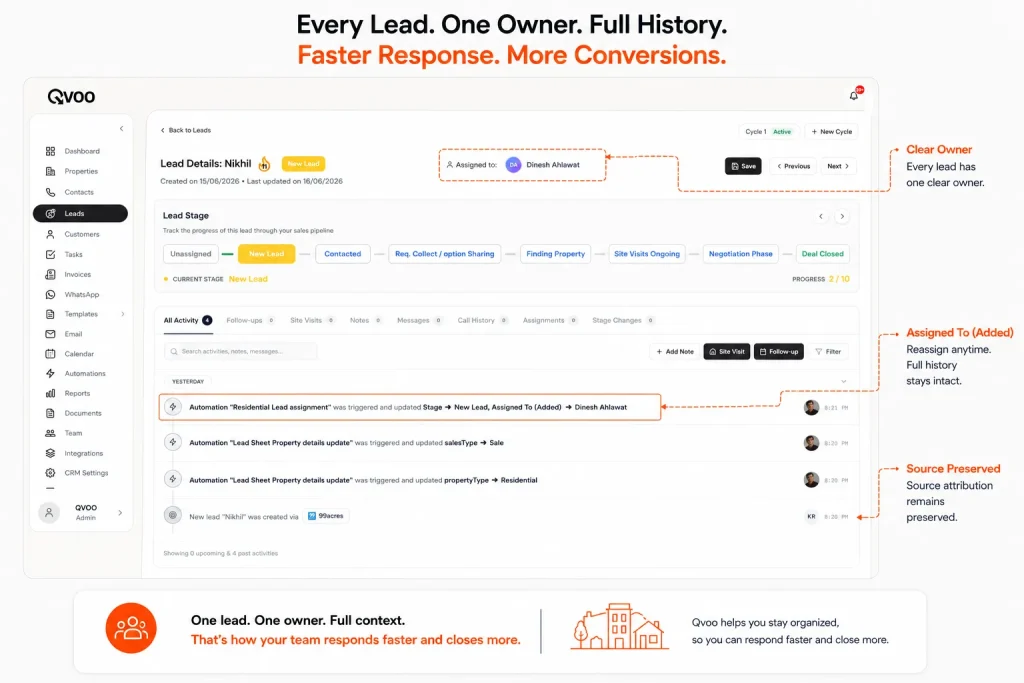
Agents see only what’s theirs. You can set an agent to view assigned leads only. They open Qvoo and see a clean list of the leads they’re responsible for not the whole company’s pipeline. Managers and admins still see everything. This single setting kills double-calling and cherry-picking at the same time.
Every assignment is on the record. Each lead carries an activity timeline that logs when it was assigned, reassigned, called, noted, or moved a stage. When you ask “what happened with this lead,” you read the timeline instead of guessing. That’s accountability you can actually point to.
Duplicate enquiries route back to the right owner. If a buyer who’s already in your system sends a fresh enquiry, Qvoo flags it as a re-inquiry and surfaces it to the people already on the lead the existing owner and your admins rather than spawning a new lead for a different agent. The relationship stays with the person who built it.
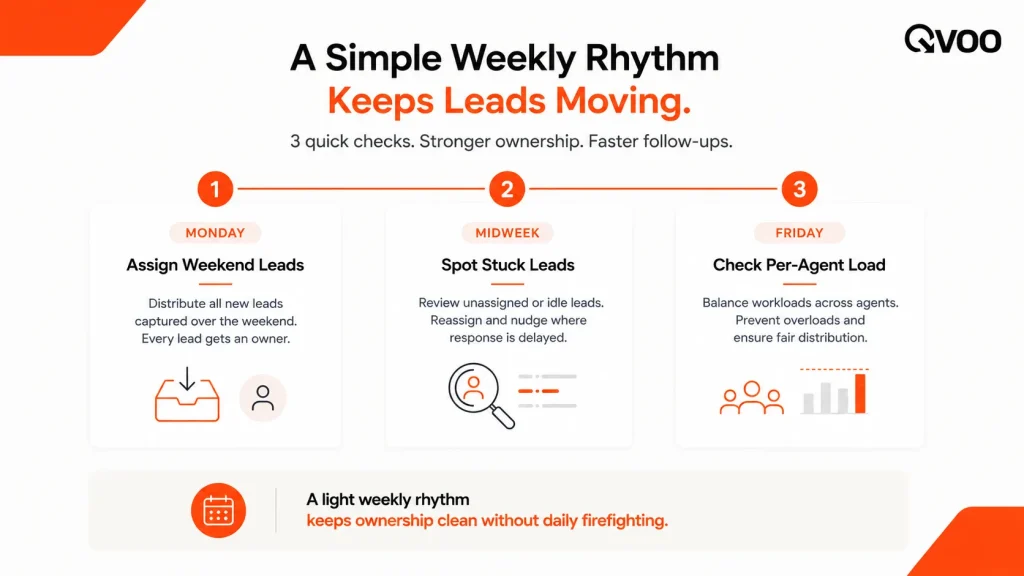
A simple weekly rhythm for managers
Assignment isn’t a one-time setup. The teams that stay tidy run a light weekly check:
- Monday: assign the weekend’s leads first thing, by your chosen rule, before anyone starts calling.
- Midweek: scan for leads that haven’t moved in your dashboard. A lead sitting in the same stage for days usually means the owner is stuck or overloaded reassign or coach.
- Friday: pull a quick per-agent view of how many leads each person is carrying and how many advanced a stage. Uneven loads and zero-progress leads are your early-warning signs.
Qvoo’s dashboard shows team activity and pipeline by stage in real time, and the report builder lets you pull a per-owner or stuck-lead view in a few clicks so this rhythm takes minutes, not a morning of spreadsheet wrangling.
The bottom line
More leads won’t help a team that can’t say who owns the ones it already has. Clear assignment one owner per lead, visible to everyone, easy to reassign, with a record of who did what is what turns a pile of enquiries into a pipeline you can actually manage.
Pick your rule. Make ownership obvious. Keep agents focused on their own list. Do that, and the leads stop falling through the cracks.
Want to see clean lead ownership in action? Book a quick Qvoo demo and we’ll show you how a team of any size can assign, track, and follow up on every lead from one place.
Do you want to make Lead distribution easy and automated?
Distribute your lead and work between your agents and make the most out of your precious leads with QVOO you can automate this and make your business easy.
Frequently Asked Questions
How should a real estate team decide who gets which lead?
Start by choosing one rule round-robin for similar agents, by territory or project for location-specific teams, or by skill for protecting high-value enquiries. Write it down so assignment isn’t a daily debate, then let your CRM apply it the moment leads arrive.
How do you stop two agents from calling the same buyer?
Give every lead a single owner and limit each agent’s view to their own assigned leads. When agents only see what’s theirs, nobody accidentally dials a colleague’s buyer. In Qvoo CRM you do this by setting an agent to view assigned leads only.
What happens to a lead when an agent leaves or goes on leave?
Reassign it to another agent. In a good CRM the lead moves with its full history notes, calls, stage so the new owner picks up where the last one left off instead of starting cold. In Qvoo, reassigning is a single action and the activity timeline stays intact.
Is automatic round-robin always the best way to assign leads?
Not always. Round-robin is fair and simple but ignores who’s best suited to a lead. Builders and project-focused teams often do better routing by territory or project, and many teams protect high-value enquiries by sending them to a senior closer. Match the rule to how your team actually sells.
What if the same buyer enquires twice from different sources?
That’s a duplicate, not a new lead it should go back to the agent who already owns the relationship, not to a new person. Qvoo flags repeat enquiries as a re-inquiry and surfaces them to the existing owner and admins instead of creating a fresh lead.
How do I hold agents accountable for the leads they’re given?
Use a record. When every assignment, call, note, and stage change is logged against the lead, you can see exactly what happened without relying on memory. Qvoo’s activity timeline and per-owner reports give you that view in a few clicks.